

WeaselClub
DocsAssetsUtilities
  • Docs
  • One Click Inventory
    • Installation
    • Create a Basic Wardrobe
    • Update Log
    • Advanced Features
      • Enable Extra Objects
      • Disable Objects
      • BlendShape Changes
      • Material Swaps
  • See Through Hair
    • Installation
    • Usage
    • Cautions
    • License Guide
    • License Changelog
    • FAQ
    • Update Log
  • BlendShape++
    • Installation
    • Usage
    • Cautions
    • Update Log
  • MMD Eye Fix
    • Installation
    • Usage
    • Update Log
  • Merge Tool
    • Installation
    • Usage
    • Cautions
    • Update Log
  • License
    • Asset License Policy
Docs/One Click Inventory/Advanced Features/Disable Objects

Disable Objects

This feature lets you specify objects to turn off when the current item is enabled.

For example, if you want to hide neko ears when wearing a hat, add the ear object to the disable list in the hat item's [Inventory] component.
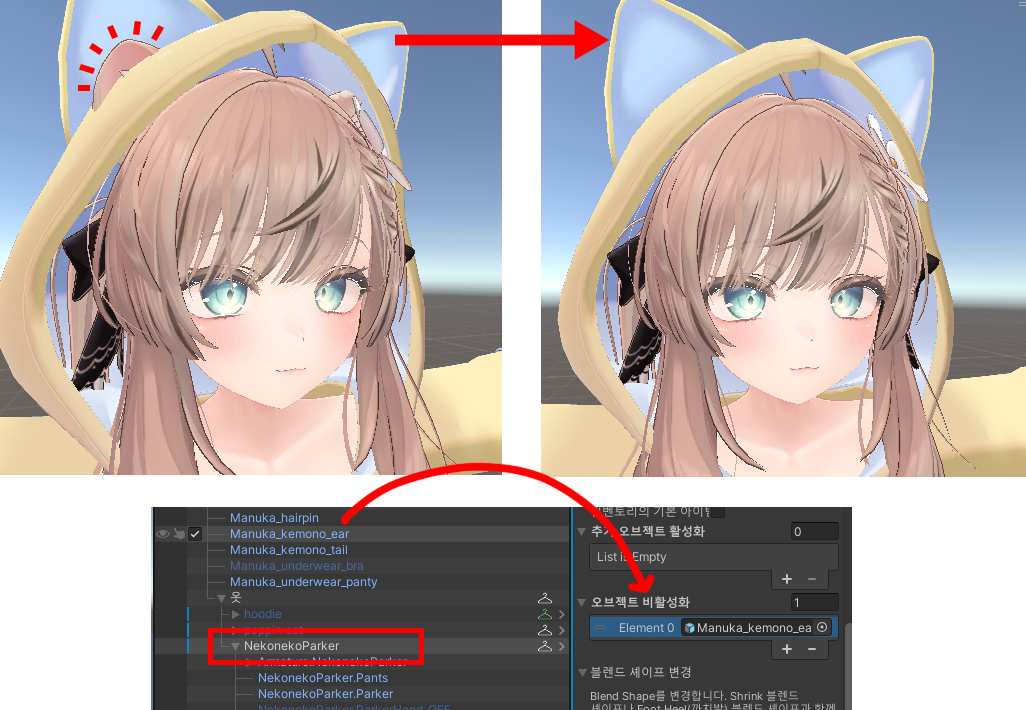
screenshot

Last updated Aug 19, 2026

Enable Extra ObjectsBlendShape Changes

© 2026 WeaselClub